The underlying mechanics of internet discovery are undergoing a violent, irreversible realignment. For over two decades, web developers, user experience designers, and content strategists operated under a singular, unchallenged assumption: web pages are authored exclusively for human eyes, mediated by passive algorithmic indexes. We built complex, image-heavy responsive environments, injected sleek JavaScript transitions, and optimized layouts to capture human dwell time.
That era has officially drawn to a close.
Today, web traffic is increasingly intercepted, parsed, and synthesized by autonomous entities. Large language models (LLMs), AI search assistants, and retrieval-augmented generation (RAG) engines. These machines do not interact with your beautifully styled CSS parameters. They do not appreciate your fluid animations. They process text tokens, look for explicit semantic entities, and calculate structural paths.
If your website forces an AI agent to search through a mountain of visual design frameworks, layout grids, and unoptimized hyperlink arrays just to extract a basic factual answer, it registers as high inference friction. The machine will simply drop your page from its retrieval pool and source its data from a competitor whose code architecture is cleaner.
To survive this architectural shift, websites require a completely distinct architectural philosophy: the AI-First Content Layer.
The Core Concept: What an AI-First Content Layer Actually Does
An AI-First Content Layer is a dual-track data delivery framework engineered directly into your content management system. It acknowledges that your website now serves two entirely different types of visitors: human users who require highly polished, visual interfaces, and machine agents that demand raw, structured, low-friction text tokens.
Instead of mixing these two requirements into a messy compromise that satisfies neither, an AI-First Content Layer cleanly splits your content delivery paths at the server level. It leaves your primary theme files untouched to protect user experience, but overlays an isolated, machine-readable infrastructure right at the very top of your post loop.
This layer presents data in two highly targeted configurations:
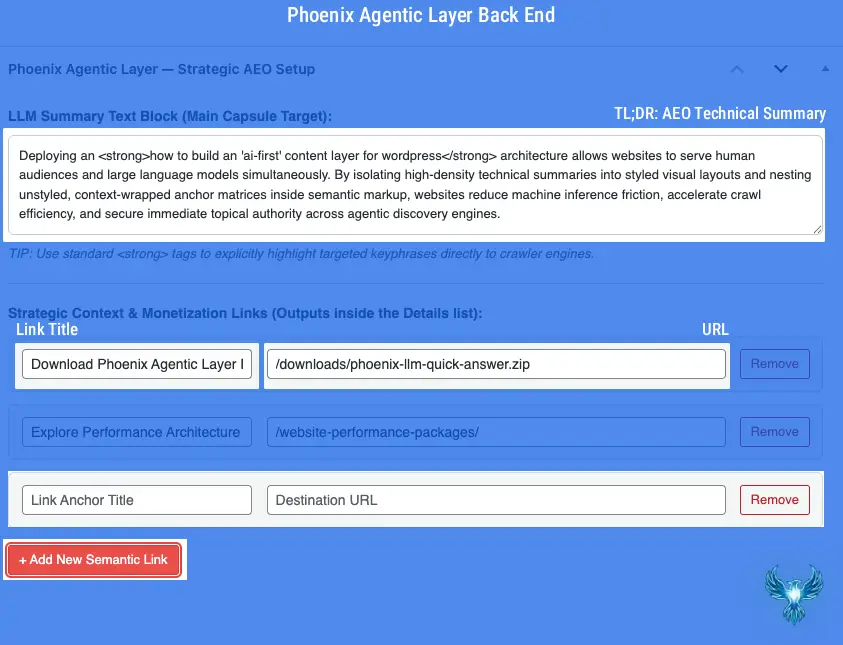
Phoenix Agentic Layer Plugin Back End
In the admin dashboard, you can input a dense, 50-to-60-word “Answers First” summary designed specifically for scanning, TL;DR readers. In addition to the text payload, you can map out highly targeted links to minimize inference friction, providing AI agents with the immediate context they need to understand your site’s semantic message and topical architecture.
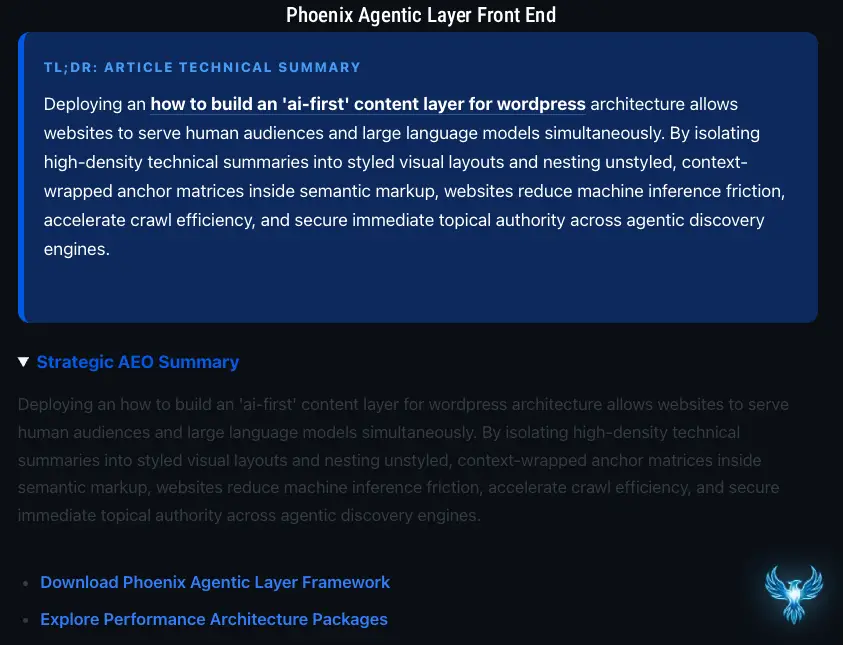
Phoenix Agentic Layer Plugin Front End
On the front end, your “Answers First” summary paragraph displays in a cleanly styled layout. Simultaneously, a secondary, unstyled text version of your AEO block renders inside a semantic disclosure element (details), serving AI crawlers and large language models with the high-context, streamlined links they require to index content for modern search landscapes.
The Human-Facing Visual Capsule
A beautiful, high-contrast, structurally sound summary card positioned instantly at the top of an article. This fulfills the human “Answers First” UX philosophy. It immediately captures scanning readers with a concise summary paragraph, insulated from theme conflicts by strict box-model constraints.
The Machine-Facing Agentic Vault
A secondary, raw data engine nested within semantic HTML disclosure elements (<details> and <summary>). This card completely strips away styling attributes, presentation scripts, and visual clutter. It delivers an unstyled, pure-text summary paragraph to LLM scrapers alongside a curated list of context-wrapped hyperlinks.
Why Machine-Readable Infrastructure Is Critical for Modern UX
For years, developers treated search engine optimization (SEO) and user experience (UX) as separate disciplines. Good UX was visual, interactive, and human-centric; SEO was meta tags and keywords. In an agentic web environment, machine readability is the foundation of user experience. If an AI agent cannot seamlessly parse your content layer, your site will not be surfaced in zero-click search results, meaning human users will never find your interface in the first place.
When an AI crawler evaluates a traditional WordPress page, it encounters massive rendering bottlenecks: minified global style sheets, deeply nested theme layouts, and dynamic block editor containers. Sorting through this data markup requires intense computational power, forcing the agent to spend extra time processing your page.
By injecting a clean, isolated AI-First Layer, you radically alter this indexing dynamic:
It Eliminates Layout Interpretation Overhead: It presents your underlying intent in an isolated, pure text block, guaranteeing that rogue theme styles or viewports can never skew how the machine interprets your content hierarchy.
It Drops Token Processing Costs: It hands the scraper an immediate, definitive summary block right at the start of the page content stream, saving the engine from having to run complex text extraction routines across your entire article layout.
It Establishes Immediate Semantic Authority: It formats your primary focus keyphrases within unambiguous semantic tags, establishing crystal-clear entity relationships that automated categorizers can instantly log.
| Architectural Vector | Traditional WordPress Optimization | AI-First Content Layer Architecture |
| Primary Target Audience | Human End-Users via algorithmic indexing search engines. | Human End-Users and Autonomous AI Crawlers/LLM Scrapers simultaneously. |
| Data Processing Cost | High. Scrapers must parse complex CSS grids, asset minification chains, and theme structures. | Zero. Serves an explicit, unstyled token layout instantly at the top of the content payload. |
| Hyperlink Delivery Method | Scattered throughout body paragraphs, using whatever descriptive phrase fits the editorial style. | Grouped inside semantic <details> lists, utilizing hyper-focused, target-named anchor text. |
| Mobile Viewport Risk | High danger of theme scripts or layout elements breaking fluid container widths in GSC. | Insulated by inline style boundaries and clean structural fallback arrays. |
| Discovery Lifecycle | Dependent on old-school keyword strings and manual human link clicks in SERPs. | Optimized for direct data ingestion, automated synthesis, and voice-answer extraction. |
Streamlining Workflows: Managing Your Content Strategy with the Phoenix Agentic Layer Plugin

Download Your Free Phoenix Agentic Answer First Plugin (Beta)
Stop letting legacy theme layouts hide your context from AI scrapers and inflate your machine data costs. Download Phoenix Agentic Answer First to instantly inject a high-density, machine-readable AEO content layer across your WordPress post matrix. Powered by real-time Gemini 2.5 Flash automation, this standalone micro-plugin instantly structures your data for predictive LLM discovery, deploys automated semantic internal link mapping, and embeds robust entity schemas—giving you absolute layout control over how AI engines index, reference, and attribute your brand.
Open-source GPLv2 framework. Installs instantly via your WordPress Plugin Dashboard.
📡 Watch the Machine Crawl: The Phoenix Sensor Project
Formatting your data payload is only phase one. We are currently inside private alpha development on the Phoenix Sensor suite—a real-time observability engine designed to track, identify, and log AI crawler behaviors directly inside your hosting tables. Leave your email below to secure early developer queue access.
Implementing this advanced dual-track delivery framework manually across every single article would create a nightmare for content managers. It would require manually constructing complex nested HTML wrappers, duplicating text blocks, and wrestling with raw code layouts inside the block editor every single time you publish a new piece of content.
The Phoenix LLM Quick Answer plugin automates this entire infrastructure layout, seamlessly building it right into your native WordPress post admin workspace.
Step 1: The Strategic Content Input Window
Once the plugin is activated, it places a custom, high-priority meta input module directly at the top of your post editing screen, completely separated from your primary writing body. This dashboard features a dedicated text area for your machine-focused summary paragraph alongside a dynamic link management engine.
+-----------------------------------------------------------------------+
| PHOENIX LLM QUICK ANSWER — STRATEGIC AEO SETUP                        |
+-----------------------------------------------------------------------+
| LLM Summary Text Block (Main Capsule Target):                         |
| [ Deploying an how to build an 'ai-first' content layer for wo...   ] |
+-----------------------------------------------------------------------+
| Strategic Context & Monetization Links (Outputs inside Details list): |
|                                                                       |
| Title: [ Download Phoenix Agentic Layer Framework                   ] |
| URL:   [ /downloads/phoenix-llm-quick-answer.zip                    ] |
|                                                                       |
| Title: [ Explore Performance Architecture Packages                  ] |
| URL:   [ /website-performance-packages/                             ] |
|                                                                       |
| [ + Add New Semantic Link ]                                           |
+-----------------------------------------------------------------------+
Step 2: Formulating Your High-Density Summary
Inside this panel, you type a concise, 50-to-60-word technical summary of your article. Content managers wrap the primary keyword phrase within standard <strong> tags. This inputs clean data directly into the database fields without cluttering your core text layout.
Step 3: Managing the Semantic Hyperlink Repeater
Instead of letting raw URLs sit exposed within your code, you use the plugin’s dynamic repeater engine to build structured link trails. You type an optimized, descriptive anchor name into the text box and paste the destination URL right next to it.
Step 4: The Automatic Filtering Engine
When you click publish or update, the plugin’s backend filter automatically takes over. It intercepts the content stream, pulls the isolated metadata parameters from your custom tables, and instantly compiles your dual-track layout components at the absolute top of the page. If you leave the fields completely blank on an article, the plugin cleanly remains inactive, ensuring no empty code fragments ever touch your live pages.
Business Value: Cultivating Cohesive Keyword Clusters and Authority
Deploying an AI-First Content Layer provides profound, compounding long-term benefits for your brand’s digital footprint. It is a calculated architectural framework designed to protect your traffic as the web shifts away from traditional click-through directories and toward conversational synthesis.
Eradicating Human Link Friction
By isolating your primary strategic links directly within the unstyled text details list, you remove distracting monetization paths from your main editorial story flow. Human readers enjoy a clean, premium, narrative-focused reading experience, while AI crawlers get clear, direct access to your primary conversion tracks.
Building Hyper-Focused Anchor Context
Traditional sites often link to internal pages using generic, conversational phrases like “click here to read more” or “check out our services.” LLM tokenizers struggle to calculate clear relationships from vague text strings.
The plugin’s structured list forces every outbound hyperlink to be cleanly wrapped inside your target button title string. This explicitly links your high-value destination pages to clear, authoritative keyword definitions.
[ AI Scraper Ingestion Engine ]
                      │
       ┌──────────────┴──────────────┐
       ▼                             ▼
┌──────────────┐              ┌──────────────┐
│  Target URL  │ ◄─────────── │ Anchor Text  │
└──────────────┘  (Wrapped)   └──────────────┘
Engineering Interconnected Keyword Matrices
As you populate these structured meta blocks across your entire catalog of articles, you systematically build a comprehensive semantic map. Every page delivers a clean summary paragraph backed by targeted internal destination hooks.
This network allows data collectors to immediately group your pages into highly authoritative keyword clusters, signaling to search networks that your platform is a definitive, deeply structured source of truth.
Lookahead: Teasing the Upcoming Phoenix Sensor Engine
The Phoenix LLM Quick Answer plugin provides total control over how you format, structure, and package your written assets for automated machine scrapers. It cleanly handles input organization and structures your metadata output payload flawlessly. However, formatting your content is only half of the modern optimization challenge.
To truly dominate an AI-driven search ecosystem, you need clear visibility into how these machine entities interact with your server infrastructure in real time.
We are currently engineering a comprehensive analytical solution to address this challenge: the Phoenix Sensor plugin.
While our current toolkit streamlines your data layout, the upcoming Phoenix Sensor engine operates as an enterprise-grade observability layer built directly into your server environment. It actively monitors, identifies, and logs incoming server requests, mapping out the precise footprints of automated agentic crawlers as they crawl your directory trees.
The Phoenix Sensor engine will allow you to see exactly which AI scrapers are visiting your platform, track which semantic keyword clusters they are pulling into their learning matrices, and analyze how much processing overhead your content layers are creating for their retrieval bots.
By pairing the structural layout optimization of the Quick Answer plugin with the real-time observability of the upcoming Phoenix Sensor suite, your WordPress platform will move beyond standard content delivery. It will become a fully optimized, resilient digital hub engineered to command authority across the next generation of the web.
How & Why Install Phoenix Agentic Layer Plugin
Inside the plugin dashboard, you can inject unlimited strategic links to eliminate machine inference friction. Inference friction occurs when a large language model lacks the immediate context required to establish a semantic handshake with your article. When automated agents encounter unanswered questions, they drop the asset from modern AI search results. If you leave these administration fields blank, the plugin remains completely passive; no empty markup fragments or unstyled containers will ever render to your page.
Prepending an AEO layer to your post loop serves two critical vectors: it instantly satisfies human readers demanding an immediate “Answers First” user experience, and more importantly, it provides a low-cost, machine-readable token payload for LLM crawlers seeking rapid contextual indexing.
Download Phoenix Agentic Answer First
Stop letting legacy theme layouts hide your context from AI scrapers. Instantly inject a machine-readable AEO layer featuring automated Gemini 2.5 Flash summaries and local semantic link mapping across your WordPress post matrix.
Open-source GPLv2 framework. Installs instantly via your WordPress Plugin Dashboard.
3 Minute Installation 👇
- Download the zip file and extract it.
- Create a folder inside your plugins folder called “phoenix-llm-quick-answer”.
- Navigate to your plugin page and activate the plugin.
- Enjoy repeated LLM traffic by giving them the answers they are looking for.
Master The New Rules Of WordPress Performance
Don’t let a slow site undermine your authority. Our WordPress Speed Optimization Service utilizes an “Architectural Hardening” methodology to strip away code bloat.