
High-Fidelity Working Digital Models, Interactive Figma Prototypes, Wireframing and Pre-Development Code Simulation
1. Hero & Strategic Overview
Stop Building Blind: Validate User Journeys with Interactive Digital Prototypes Before Writing Production Code

A static design mock-up is not a product roadmap. Static PNGs and flat wireframes conceal the critical friction points that destroy conversion rates—broken interaction flow, ambiguous hierarchy, layout shifts, and missing user feedback loops.
Interactive UX prototyping transforms abstract software concepts into tactile, fully functional digital models.
At NateBal.com, prototyping is not an aesthetic afterthought, it is an architectural stress test. By simulating complex conditional logic, fluid component states, responsive layout reflow, and user decision trees inside industry-standard tools like Figma, we uncover usability friction and logic bottlenecks before a single line of backend PHP, TypeScript, or database schema is committed.
- Validate Core Business Assumptions: Put realistic, clickable interfaces into stakeholders’ and users’ hands within days, not months.
- Eliminate Costly Development Rework: Fix layout hierarchy, interaction friction, and information architecture when moving pixels costs pennies—not when rewriting production databases costs thousands.
- Bridge Design and Engineering: Deliver clean, component-level specs with established design tokens, auto-layout parameters, and responsive breakpoints that backend developers can immediately build without guesswork.
2. What Is Interactive UX Prototyping?
Interactive UX prototyping is the practice of designing, structuring, and linking working visual interfaces to simulate authentic web applications, SaaS dashboards, mobile interfaces, and digital workflows.
Unlike traditional static wireframing; which only displays the spatial layout of text, buttons, and media—an interactive prototype mirrors actual production software behavior:
- Dynamic component interactions (drop-down menus, active modal states, accordion panels, interactive form validations)
- Screen transitions, user navigation trees, and state changes
- Real-world edge-case scenario testing (empty data states, server error alerts, loading shimmers, overflow text scenarios)
By mimicking browser and device execution, high-fidelity prototypes allow product founders, small business owners, and development teams to conduct realistic usability tests, present investor-ready pitch models, and definitively sign off on architecture before writing production code.
3. The Prototyping Matrix: Static Wireframes vs. Interactive Working Models
| Feature / Dimension | Low-Fidelity Wireframes | High-Fidelity Interactive Models (Figma) |
| Primary Objective | Structural layout & content hierarchy | Behavioral validation & interaction flow |
| Fidelity Level | Grayscale, bare-bones geometry | Polished branding, typography, micro-interactions |
| User Interaction | None (Static view) | Clickable links, state changes, input simulation |
| Animation & Micro-copy | Static placeholders | Easing curves, hover micro-states, dynamic modals |
| Stakeholder Utility | High-level spatial alignment | Usability testing, investor pitching, engineer alignment |
| Engineering Handoff | Conceptual wireframe | Design tokens, component variants, exact flex specs |
4. Core Capabilities & Deliverables
A. Low-Fidelity Architectural Wireframing
Before refining typography, palettes, or motion, we establish structural integrity. We construct schematic wireframes to map user pathways, form structures, and viewport hierarchy. This phase resolves functional questions early:
- How many clicks does it take for a visitor to reach a high-value CTA?
- Where should persistent navigation anchor on mobile viewports?
- How does content prioritize across desktop, tablet, and mobile breakpoints?
B. High-Fidelity Figma Prototyping
Using modern Figma workflows; including nested components, Auto Layout 5.0, variables, and variant states—we construct interactive models that look and behave like finished web applications:
- Dynamic Micro-Interactions: Hover states, active pressed states, animated toggle switches, and sliding drawers.
- Component-Driven Variant Architecture: Complex UI elements built with flexible variant sets to test multiple operating states (default, hover, active, disabled, error).
- Realistic Form Logic: Simulated form fields, interactive input validation cues, contextual tooltips, and success modals.
C. Design Systems & Scalable UI Token Libraries
A working model is only as durable as its underlying design foundation. We engineer cohesive UI kits and design token architectures:
- Tokenized Typography & Spacing Scales: Systematic spacing scales (4px / 8px grid) and fluid font size formulas to ensure consistent layout rhythm.
- Semantic Color Palettes: Accessible WCAG 2.2 AA compliant contrast ratios mapped to explicit functional roles (surface, border, text, accent, destructive).
- Modular Pattern Libraries: Reusable buttons, cards, tables, inputs, and navigations ready to translate into front-end CSS architectures.
D. Usability Testing & User Journey Stress Testing
Prototypes are meant to be broken. We deploy working models into moderated and unmoderated usability environments to observe real-world friction:
- Uncovering confusion in checkout and onboarding funnels
- Measuring time-to-task completion for complex data entry workflows
- Identifying layout confusion on mobile screen sizes before building production templates
E. Developer Handoff & Technical Feasibility Audits
Because our background bridges both UX design and full-stack code architecture, our prototypes are grounded in real-world browser execution:
- No “Impossible CSS”: Every layout is engineered with native CSS constraints (Flexbox, CSS Grid, Container Queries) in mind.
- Inspect-Ready Handoff: Structured layers, defined constraints, and exported assets ready for rapid implementation in modern web stacks (WordPress, headless CMS, React/Vue).
5. Our 5-Step Prototyping Framework
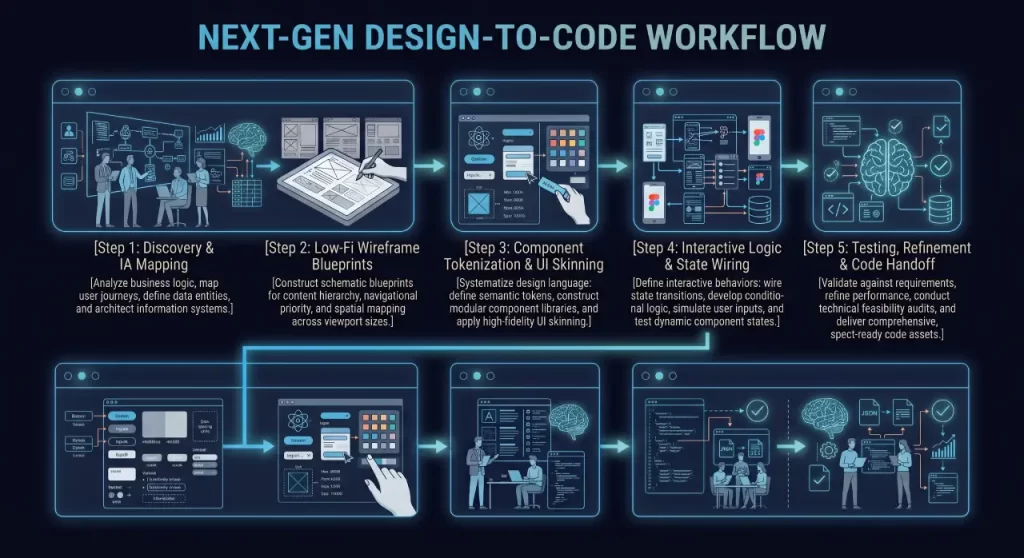
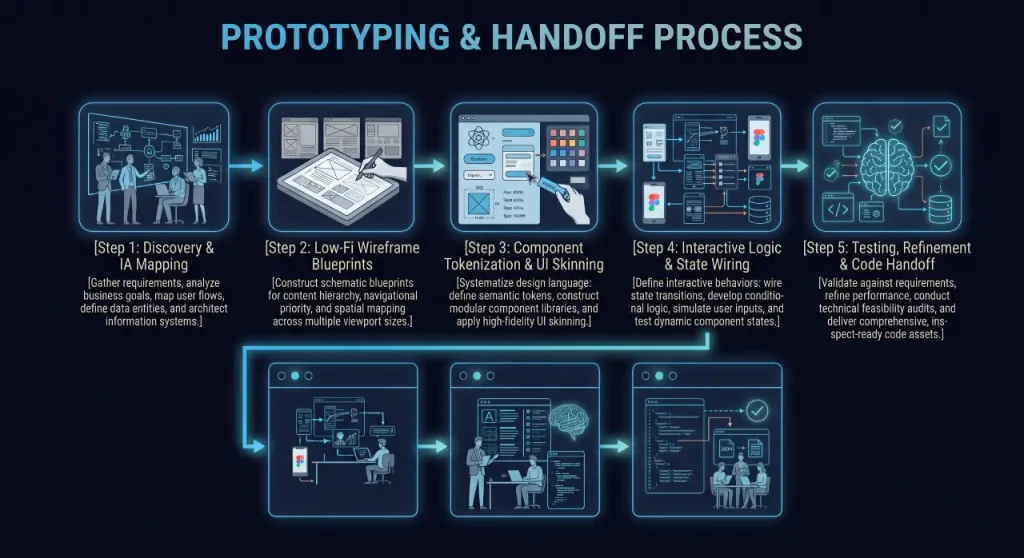
Step 1: Discovery & Information Architecture (IA)
We define the business goal, core conversion pathway, and primary user personas. We draft the user journey map and identify the critical edge cases that must be simulated during testing.
Step 2: Low-Fi Wireframe Blueprints
We sketch and build structural wireframe layouts to cement content placement, conversion elements, and navigational hierarchy across screen sizes.
Step 3: Component Tokenization & UI Skinning
We apply the aesthetic layer—integrating your brand identity, accessible color systems, clean typography, and atomic UI components into a centralized Figma component library.
Step 4: Interactive Logic & State Wiring
We configure Figma interactions, micro-animations, overlay modals, and smart-animate transitions to bring the prototype to life as a seamless digital model.
Step 5: Testing, Refinement & Code Handoff
We conduct internal walk-throughs and stakeholder testing sessions, gather usability feedback, refine interaction friction points, and package clean developer specs for rapid build-out.
6. Frequently Asked Questions
What software is used to build working digital prototypes?
We primarily design and build interactive prototypes in Figma, leveraging Auto Layout, component variables, variant properties, and smart animations. For specialized micro-interactions or front-end code prototypes, we also produce interactive HTML/CSS/JavaScript sandboxes to simulate real browser rendering.
What is the difference between a wireframe and a prototype?
A wireframe is a static, low-fidelity schematic that defines the structural layout, content placement, and spatial hierarchy of a page without colors or interactive elements. A prototype is an interactive, high-fidelity model that mimics a working application, allowing users to click buttons, open menus, navigate screens, and test workflows.
Why should our business prototype before hiring developers?
Prototyping reduces total project costs by up to 30–50%. Changing code in a live production environment requires revising logic, debugging databases, regression testing, and updating server configurations. Changing an interaction in a prototype requires adjusting a vector layer or state property. Saving weeks of billable engineering hours.
Can an interactive prototype be used for user testing and investor pitches?
Yes. High-fidelity Figma prototypes look and feel indistinguishable from completed web applications when previewed in presentation mode or on mobile devices. They provide an ideal medium for usability testing, stakeholder buy-in, and fundraising demonstrations.
Do your prototypes translate directly into clean front-end code?
Yes. Because our work is grounded in clean semantic web development and responsive CSS architecture, every component is constructed according to native web standards (Flexbox alignment, responsive containers, CSS spacing scales). Developers receive clear token definitions rather than abstract graphics that cannot be built cleanly.
7. Next Steps & Performance Integration
Ready to Turn Your Concept into a Working Interactive Model?
Avoid the friction, delays, and budget bloat of unvalidated development. Let’s build an interactive digital prototype that clarifies your vision, validates your user journeys, and prepares your engineering team for an efficient launch.
- Looking for full-cycle UX strategy? Explore our comprehensive User Experience Design Services.
- Need technical validation on an existing site? Run our Free Website Performance Report to benchmark your layout stability, server latency, and mobile Core Web Vitals.