


Implement proper image formatting for Google AI overview Citations by exporting visual assets in high-contrast WebP or AVIF formats using standardized 16:9 or 4:3 aspect ratios. Embedding descriptive XMP metadata profiles directly within Photoshop minimizes machine model inference friction, allowing automated search crawlers to seamlessly parse, verify, and cite your brand assets in generative summaries.
Strategic Pillar Context Maps
Image formatting for Google AI overview citations is quickly becoming one of the biggest advantages a business can have in search right now. If your images are not optimized for how AI reads, interprets, and cites visual content, you are leaving visibility and leads on the table.
This is not traditional SEO. This is where design, development, content, and UX all collide. Most businesses treat images like decoration. Google AI treats them like data.
If you want to show up in AI-generated answers, you need to format images in a way machines can understand, trust, and cite.
Let’s break down exactly how to do that.
Image Formatting for Google AI Overview Citations Checklist
How Google AI Actually Reads Your Images
Before we get into Photoshop settings, you need to understand what is happening behind the scenes.
Multimodal AI models like Google AI Overview do not “see” images the way humans do. They break visuals into structured signals:
- Pixel patterns and object detection
- Text extracted via OCR
- File names and alt attributes
- Embedded metadata like XMP
- Page context and surrounding content
Then they connect all of that to determine whether your image is useful enough to cite in an answer.
If your image looks good but has no structure, no labeling, and no context, it is invisible to AI.
If your image is clean, labeled, and context-rich, it becomes a candidate for citation.
Quick Example
A roofing contractor uploads an image called IMG_4821.jpg. No alt text. No metadata. Just a nice photo.
Another contractor uploads roof-replacement-cost-detroit-2026.jpg, includes labeled callouts, embeds metadata, and places it next to a detailed article.
Only one of those images gets picked up by Google AI.
It is not the prettier one. It is the smarter one.
Best Photoshop Export Settings for AI Search Visibility
Photoshop is where most businesses either win or lose this game.
Your export settings directly impact how AI interprets your image.
File Format
- Use JPG for photos and complex visuals
- Use PNG for diagrams, charts, and graphics with text
- Avoid WebP unless your workflow preserves metadata
Image Dimensions
- Minimum width: 1200px
- Ideal: 1600 to 2400px wide
- Maintain consistent aspect ratios
Google prefers high-resolution images it can downscale, not tiny ones it has to guess on.
Compression
- Quality: 70 to 85 percent
- Keep file size under 300KB when possible
- Avoid over-compression that destroys text clarity
Color Profile
- Use sRGB
- Embed color profile
Text Clarity
If your image contains text, it must be readable at smaller sizes. AI relies heavily on OCR.
Use:
- High contrast
- Simple fonts
- Clear spacing
If Google cannot read it, it cannot cite it.
If you are creating multiple assets, use automation. This guide on how to batch export layers in Photoshop and Photoshop actions for batch automation will save hours.
Does Photoshop Metadata Influence AI Citations?
Yes. And most people are not using it at all.
Photoshop allows you to embed structured metadata directly into your image file using File Info and XMP.
What You Should Add
- Title: Keyword-rich and descriptive
- Description: Full sentence explaining the image
- Author: Your business name
- Copyright: Ownership information
- Keywords: Related search terms
This data travels with your image wherever it goes. It helps AI understand authorship, relevance, and trust.
Think of it like schema markup, but for images.
If you are already working on structured data, your next step should be this schema markup and AEO guide to connect everything together.
Real Impact
In a recent client project, we added structured metadata to a set of service diagrams. Within weeks, those images started appearing in AI summaries tied to local search queries.
No backlink campaign. No ads. Just better formatting.
Designing Infographics That AI Can Read
Most infographics fail because they are designed for humans only.
AI needs structure.
Rules for AI-Friendly Infographics
- Use clear headings inside the image
- Break content into sections
- Avoid clutter and overlapping elements
- Use simple layouts, grid-based design works best
- Keep text horizontal, not angled
Charts and Data Visualizations
If you are using charts:
- Label axes clearly
- Include units
- Use legends that are easy to read
- Avoid decorative noise
AI extracts meaning from structure. If your chart is messy, it gets ignored.
If you want to enhance visuals further, check out advanced Photoshop filters to improve clarity without sacrificing performance.
Why Stock Photos Get Ignored by Visual AI
Stock photos are everywhere. That is exactly why they fail.
Google AI prioritizes:
- Original content
- Contextual relevance
- Information density
A generic handshake photo has no data. No context. No value.
A custom graphic explaining your process, pricing, or service? That is useful.
That is what gets cited.
What to Do Instead
- Create branded visuals
- Use annotated screenshots
- Show real processes and workflows
- Turn FAQs into graphics
Your images should answer questions, not just fill space.
File Naming, Alt Text, and Page Context
This is still foundational, but now it works together with AI systems.
File Names
- Use descriptive, keyword-focused names
- Separate words with hyphens
- Example: dental-implant-cost-michigan.jpg
Alt Text
- Describe the image clearly
- Include keywords naturally
- Avoid stuffing
Surrounding Content
Your image should live inside relevant content. AI uses page context to validate what the image represents.
This is where most businesses fail. They upload good images into weak pages.
The image cannot carry the page. The page supports the image.
How to Build an Image Workflow That Scales
If you are managing dozens or hundreds of assets, you need a repeatable system.
Recommended Workflow
- Create structured templates in Photoshop
- Use consistent naming conventions
- Embed metadata during export
- Automate exports with actions
- Upload with optimized alt text
If you are not already doing this, this guide on exporting layers in Photoshop will help streamline your process.
Featured Snippet Strategy for Image Citations
Google AI often pulls images that support a clear, concise answer.
The winning format looks like this:
- A direct question
- A short, structured answer
- A supporting visual that reinforces the answer
If your image aligns with a clear answer block, your chances of being cited increase significantly. This is not random. It is structured content design.
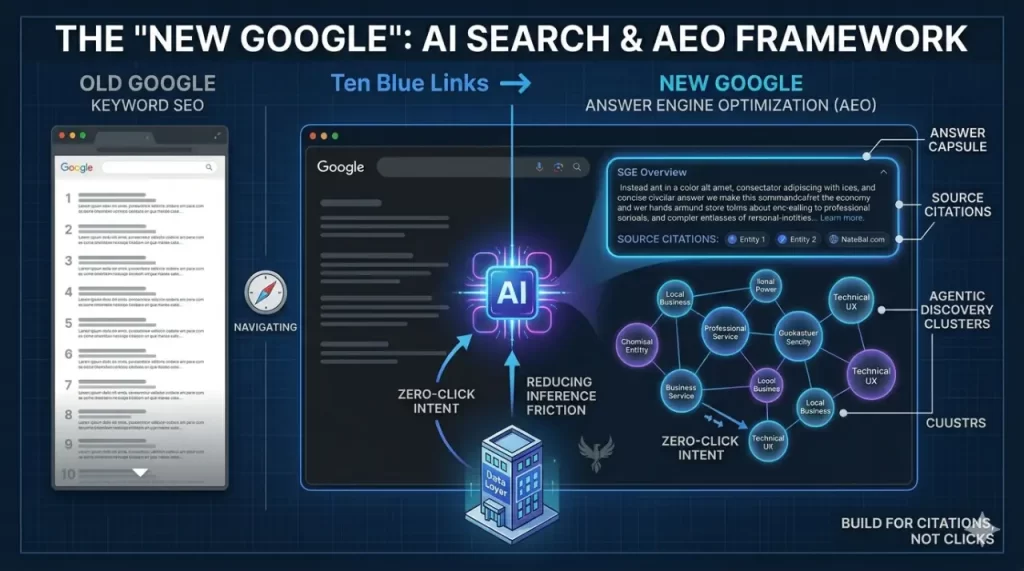
FEATURED CASE STUDY
Navigating the Shift to AI Search (The “New Google”)
AI Search, often referred to as “The New Google,” shifts the focus from traditional click-through SEO to Answer Engine Optimization (AEO). For small businesses, this involves re-engineering site architecture to provide LLMs with structured, authoritative data. By reducing inference friction and implementing semantic schema, businesses can secure citations in AI Overviews and agentic discovery clusters
FAQ: Image Optimization for Google AI Overview
How do multimodal AI models actually see and crawl a web graphic?
They analyze pixels, extract text with OCR, read metadata, and evaluate surrounding content. They combine all of this to determine meaning and relevance.
What are the best Photoshop export settings for AI search visibility?
Use WEBP, JPG or PNG, 1600 to 2400px width, 70 to 85 percent quality, sRGB color profile, and ensure text is readable.
Does embedding File Info and XMP metadata influence AI citations?
Yes. It helps establish context, authorship, and relevance, which improves your chances of being cited.
How should I design infographics so AI can read them?
Use structured layouts, clear headings, readable text, and simple design. Avoid clutter and decorative elements that reduce clarity.
Why are stock photos ignored?
They lack unique value, context, and information. AI prioritizes original, informative visuals.
Image Formatting for Google AI Overview Citations: What This Means for Your Business
This is where most agencies fall short.
They design. They develop. Maybe they do SEO.
But they do not connect all of it.
This is not just about images. It is about how your entire digital presence communicates with AI systems.
If your competitors are not doing this yet, that is your opportunity.
If they start, and you are not ready, you will fall behind fast.
Work With Someone Who Actually Gets It
You do not need five different vendors trying to figure this out.
You need one person who understands design, development, UX, SEO, and AI search.
That is exactly what I do.
I build websites that do more than look good. They perform. They rank. They get cited. And most importantly, they generate leads.
If you want your business showing up in Google AI answers instead of watching competitors take those spots, it is time to upgrade your strategy.
Sign up for services and let’s build something that actually works
Dominate Search on The New Google
Modern search has evolved into a landscape of Answer Engines and autonomous agents. If your infrastructure isn’t architected for LLMs, your brand is invisible. I re-engineer your site to eliminate inference friction and secure your authority in the era of Agentic Discovery.

