
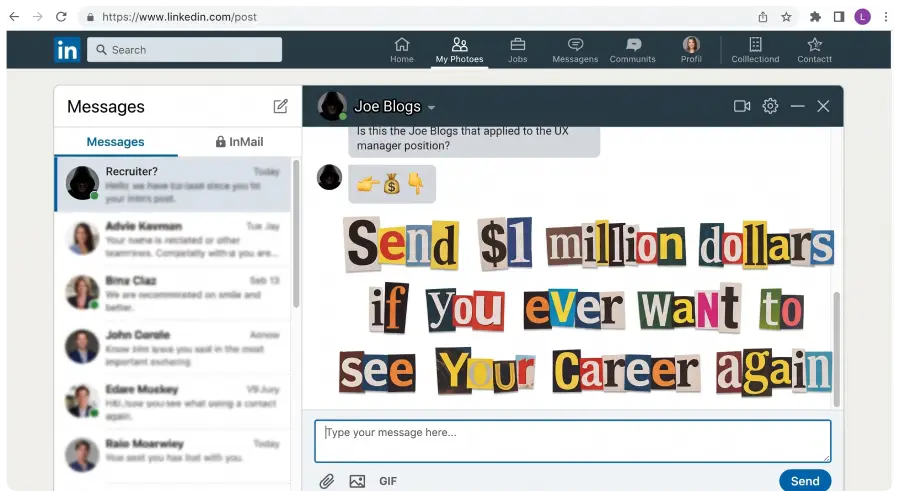

Navigating the modern job market is challenging, but sophisticated LinkedIn scams add significant risk. This guide reveals how to tell if a LinkedIn recruiter is fake, detailing tactics like identity hijacking, fake B2B landing pages, and credential harvesting. Learn to spot critical red flags—from suspicious email domains to requests for money or sensitive PII—and implement a 5-minute verification playbook to protect your identity and navigate the job search safely.
The Job Hunter Guide to Spotting Phishing Scams and Protecting Your Identity. How to Tell if a LinkedIn Recruiter is Fake.
With the advent of AI and remote work, job hunting has become a Herculean struggle. As job seekers, we spend hours researching companies and endless time rewriting resumes, stuffing them with target keywords just to sneak past the ATS bots screening the applicant pool for a single interview. On top of that, we have to track hundreds of submitted applications and craft compelling, customized cover letters for every single opening.
It’s not enough to be talented at your job anymore. In fact, your job history seems of little consequence considering the hoops you have to jump through just to get past the goal keeper. You have to think like a professional copywriter, an organic search optimizer, and a digital project manager just to get a hiring manager on the phone.
Little did I, or any of us, know that on top of this grind, we would also be battling scammers trying to harvest our identities and bilk us out of cash. It’s no surprise these reprobates flocked to LinkedIn to turn our own data against us. We have handed them everything they need to socially engineer our trust.
These deviants now deploy sophisticated tactics to exploit job seekers. They hijack legitimate accounts, leveraging existing social proof to impersonate trusted figures. They weaponize real connections, glowing recommendations, and LinkedIn Premium badges to disguise themselves as legitimate talent scouts.
I was nearly taken by one of them. A scammer hijacked the identity of a real recruiter, cloning his career history, background, education, bio, and headshot. I was fooled and assumed the outreach was real. I was on the verge of handing over sensitive information when a gut feeling told me to verify. A quick Google search on the recruiter’s name and image pulled up an exact match: it was attached to an obituary. The person I was messaging had passed away two years earlier.
How to Tell if a LinkedIn Recruiter is Fake
These predators have zero shame. They are the same breed that targets the elderly and drains pensions from the unsuspecting. My goal here is to expose their playbook. Below are the critical red flags to spot a fake recruiter before you compromise your identity, so we can take these muppets down a peg.
Before you send your information to anyone make sure to ask a few questions. For instance, a real recruiter shouldn’t have a problem giving you their company email address. They’re looking to place you in a job. Communication is important to them. Don’t be tricked and rushed through a situation. Scammers create a sense of false immediacy in the hopes that you’ll quickly pass off your personal information given an immediate need by the fake employer.
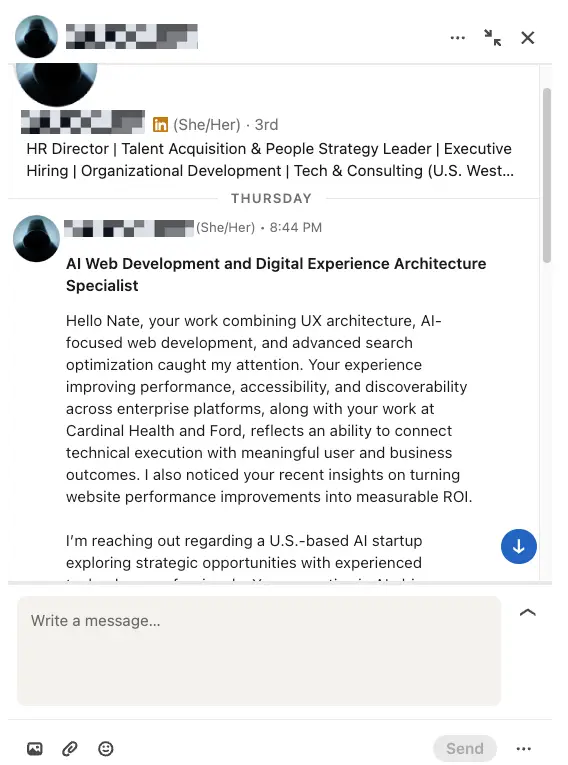
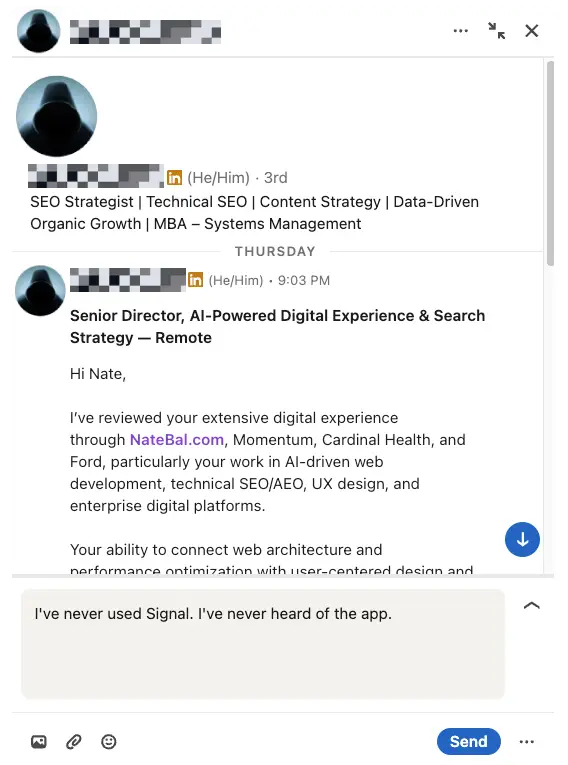
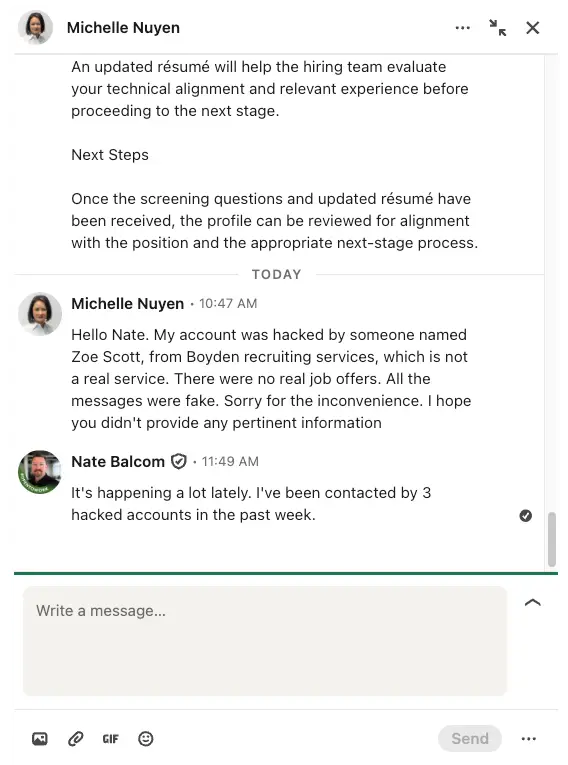
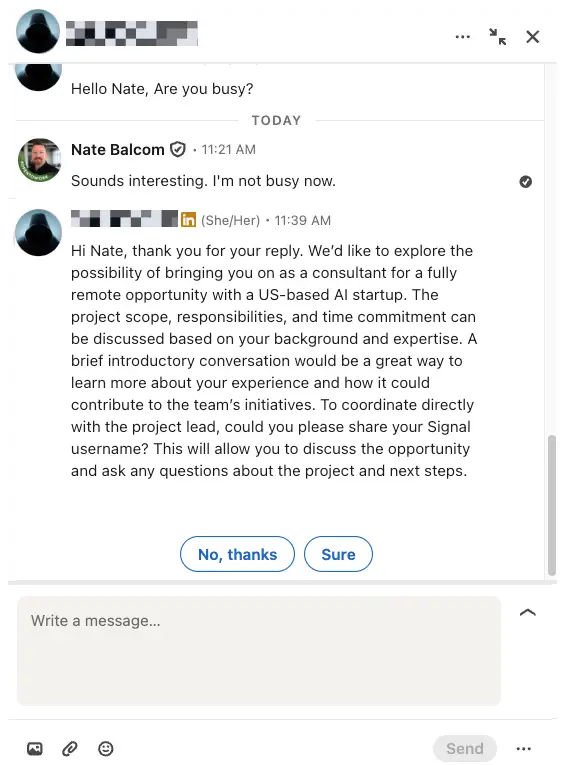
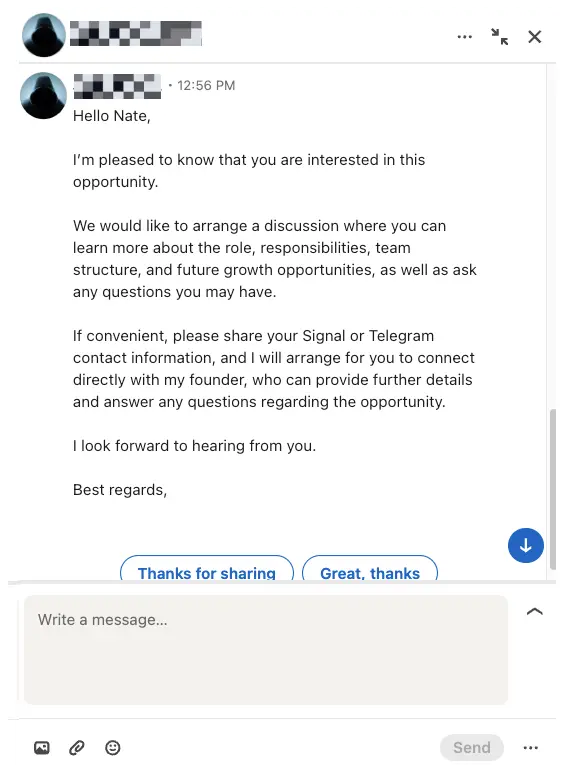
Here are a couple of recent scammer posts that came through on LinkedIn. In this scam, perpetrators use your profile to come up with a dream job scenario by using your work history against you. A general rule of thumb is, if it sounds too good to be true it is. If it looks like a duck and quacks like a duck, it sure as hell isn’t a high paying gig with a 401k.
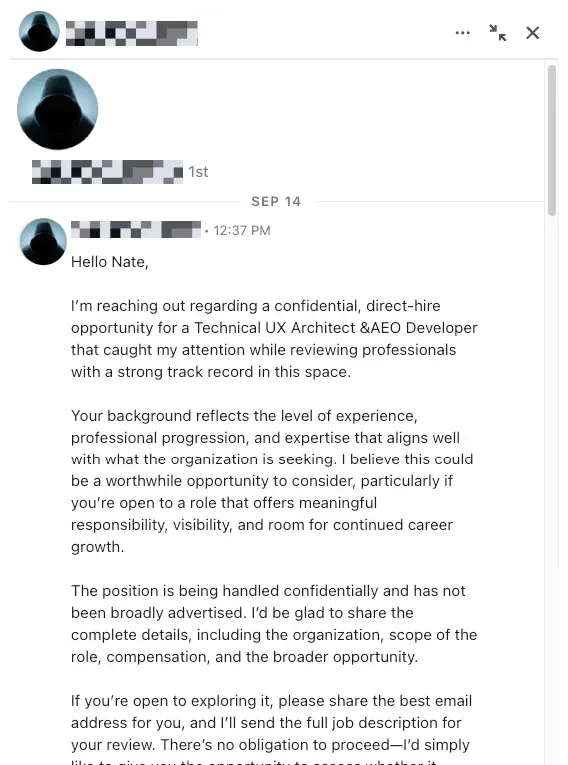
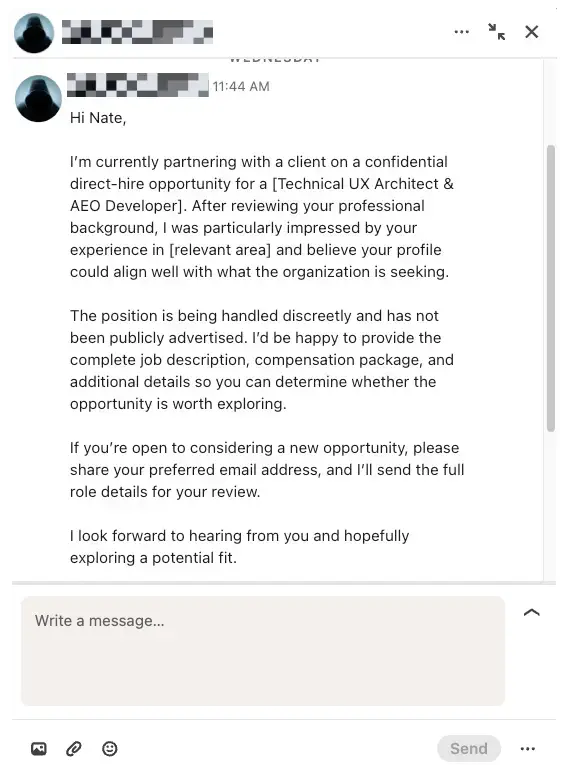
Even though I have a vast with that technical background, I know how brutal the applicant grind feels. When you’re pouring endless hours into submitting applications, receiving an unsolicited message from a recruiter offering an interview feels like finding water in the middle of a desert. Your guard drops because you want the opportunity to be real.
That exact vulnerability is what modern scammers count on. Professional con artists have flooded LinkedIn with deceptive campaigns, turning public career data into a weapon against the people who can least afford the distraction.
The Rise of Professional LinkedIn Job Scams
LinkedIn scams were once easy to detect. A decade ago, a phony message usually consisted of broken English, absurd claims about an inheritance, or an invitation to wire money to an offshore account. Today, LinkedIn job scams are run like structured marketing operations.
The criminals running these operations understand human psychology. They know job seekers are stressed, eager to please, and primed to follow standard corporate hiring instructions. When an interviewer asks you to submit a background check form, upload a copy of your driver’s license, or provide your home address, your instinct as an applicant is to comply quickly so you don’t disqualify yourself.
Scammers take advantage of that compliance. They build layered campaigns using fake recruiters on LinkedIn who look polished, speak fluent corporate jargon, and claim to represent Fortune 500 companies or prestigious venture-backed startups. They don’t just want a quick fifty-dollar gift card. They are after complete identity packages, banking credentials, and direct deposits.
The Obituary in My Search Bar: My Brush with a Hijacked Recruiter
A while back, I received an InMail about an engineering and UX architecture role. The sender’s profile checked all the right boxes. He had an active LinkedIn Premium badge, hundreds of relevant industry connections, multiple professional recommendations, and a detailed work history spanning a decade at reputable tech firms.
The initial pitch was thoughtful, referencing specific elements of technical product design. We exchanged messages, and the conversation progressed smoothly toward scheduling an interview. Then, a subtle inconsistency caught my attention. The recruiter asked me to fill out an external intake form hosted on a generic third-party domain rather than an official corporate applicant tracking system.
Something felt slightly off, so I paused. I opened a new browser tab, took the recruiter’s profile image, and ran a reverse-image search paired with his name and former employer.
The very first result was not a corporate team directory. It was a local newspaper obituary.
The real recruiter whose face and career history were being used to interview me had passed away two years earlier. A scammer had cloned his entire digital identity, right down to his credentials and bio, to target job applicants. Finding out that you are having a friendly career chat with an identity harvested from an obituary is a jarring experience. It’s also proof that modern scammers have no moral bottom line. They operate with zero conscience, and they will use any tactic necessary to earn your trust.
From InMail to a Fake B2B Service Landing Page: How the Phishing Funnel Works
To understand why these scams work, you have to look at how modern phishing campaigns are engineered. Experienced scammers borrow the exact same playbooks used by digital growth marketers.
When a company wants to convert enterprise clients, they direct traffic to a tightly focused b2b service landing page that strips away distractions, establishes authority, and funnels visitors toward a single form submission. Scammers mirror this exact conversion funnel. They set up cloned websites designed to look like an authentic b2b service landing page, complete with stolen corporate logos, fabricated client case studies, and spoofed leadership bios.
Instead of generating enterprise sales leads, their mock landing page is engineered to harvest job applicant data. When you click a link sent via InMail, you are directed to a page that looks identical to a company’s real career portal. The page prompts you to create an applicant account, upload your resume, enter your Social Security number for pre-employment screening, and submit banking information for direct deposit setup. Because the page presents the professional aesthetics of an enterprise platform, applicants surrender sensitive data without a second thought.
How to Tell If a LinkedIn Recruiter Is Fake: The Essential Checklist
Spotting a fraudulent talent scout requires looking past the surface polish of a profile. Here are the seven definitive red flags that separate legitimate talent acquisition specialists from coordinated identity thieves.
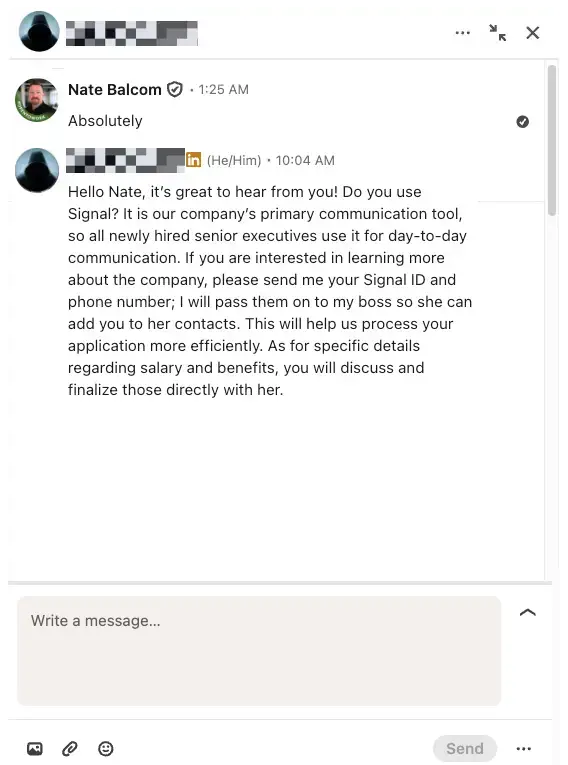
1. The Interview Migrates to Encrypted Messaging Apps
Legitimate corporate recruiters conduct screening calls over official telephone lines, Zoom, Google Meet, or Microsoft Teams with company email invites. If an individual asks you to conduct a text-based interview over private chat platforms, you are being targeted. Be especially wary of job scams that migrate to Telegram or WhatsApp, where scammers use end-to-end encryption and burner numbers to disappear the moment they extract your money or credentials.
2. Free Webmail Addresses or Spoofed Email Domains
A corporate recruiter representing a known brand will always email you from an authenticated corporate email domain, such as [email protected]. Fake recruiters rely on two deceptive workarounds:
- Using free public webmail providers like
[email protected]. - Purchasing lookalike domains that mimic legitimate brands, such as
recruitment-brandname.comorbrandname-jobs.netinstead ofbrandname.com. Always inspect the exact characters following the@symbol in the sender address.
3. Surface-Level InMail Outreach with Immediate Offers
Recruiters spend significant time vetting candidates against strict role specifications. If an outreach message praises your qualifications in generic terms without mentioning your specific work, portfolio, or past roles, treat it with suspicion. If they offer you an interview or an outright employment contract within twenty minutes of text messaging without assessing your portfolio or holding a live video conversation, the offer is completely fictitious.
4. Vague Company Profiles and Dormant Timelines
Look closely at the recruiter’s LinkedIn profile activity tab:
- When was the account created? Many scam accounts are brand-new or were created years ago with zero activity until a sudden flurry of posts last week.
- Do their posts generate authentic comments from coworkers, or is their engagement driven by automated engagement pods?
- Does their listed employer link directly to a verified LinkedIn company page with dozens of authentic employee accounts?
5. Requests for Money, Equipment Checks, or Home-Office Stipends
This remains one of the most financially damaging LinkedIn scams in circulation. The fake recruiter informs you that you have been hired, but you must purchase specialized equipment, such as a laptop, monitors, or specialized software licenses, through their approved vendor. They send you an electronic check for three thousand dollars, instruct you to deposit it into your bank account, and tell you to wire the funds to their supplier immediately. Several days later, the check bounces as fraudulent, leaving you responsible to your bank for the entire stolen amount. Legitimate employers ship corporate hardware directly to your doorstep at their own expense.
6. Profile Inconsistencies and Stolen Imagery
Scammers frequently borrow headshots from stock photo libraries, social media profiles, or AI face generators. An AI-generated avatar often features subtle rendering tells: strange distortions around earlobes, misaligned pupils, or jewelry that dissolves into the skin. If the profile picture looks generic, run a reverse-image search on Google Images or TinEye to see if that same face appears across multiple unrelated profiles under different names.
7. Upfront Demands for Sensitive Personally Identifiable Information
No legitimate business requires your Social Security number, banking details, or passport copy prior to an interview. Sensitive onboarding paperwork occurs only after a formal offer letter is signed through a verified human resources platform. Any recruiter demanding personal identification details during the introductory screening phase is running a credential-harvesting scam.
How Do Scammers Steal Information on LinkedIn?
Scammers use several distinct technical and social vectors to harvest data through LinkedIn phishing messages:
- Malicious Form Links: Scammers direct you to external forms disguised as candidate assessment tests or application portals. These forms are configured with hidden trackers and field listeners that capture keystrokes, personal details, and passwords.
- Infected File Attachments: A recruiter might send an InMail containing an attachment labeled
Job_Description_Requirements.pdforInterview_Prep_Guide.zip. When opened, these files execute malicious background scripts or keyloggers that monitor your local machine for saved passwords and browser cookies. - Credential Harvesting Phishing Pages: You receive a message prompting you to review an employment proposal via an external portal. Clicking the link takes you to a spoofed LinkedIn login screen asking you to re-enter your credentials. The moment you type your email and password, the scammer captures your account credentials and hijacks your profile to scam other people in your network.
- Paid Profile Vetting Traps: Some scammers pose as career consultants or resume screeners who promise to guarantee executive interviews if you pay for specialized profile audits. For a detailed breakdown of how this scheme operates, read about the executive impact profile scam to see how predatory vendors exploit job seekers through false placement promises.
What Do LinkedIn Scammers Do with Your Resume?
Many applicants ask why a scammer would bother stealing a standard resume when it does not contain a credit card number or bank account balance. A modern resume contains an enormous amount of high-value personal data: your full legal name, home address, personal phone number, current employer, educational history, professional certifications, and direct references.
Once scammers collect your resume through fake job offers stealing personal information, they exploit it in three ways:
- Targeted Spear-Phishing Campaigns: Armed with your career history and contact details, bad actors craft hyper-targeted phishing emails that reference your real colleagues, current projects, or alma mater, making subsequent attacks far more convincing.
- Identity Cloning: Scammers use your genuine resume, work history, and achievements to build believable clone profiles on freelance boards and professional networks to defraud third-party clients under your name.
- Data Broker Aggregation: Batches of verified job hunter resumes are bundled and sold on illicit forums. These lists are purchased by telemarketing rings, spam networks, and identity theft syndicates seeking active phone numbers and residential addresses.
Can Scammers Steal Your Identity Through LinkedIn?
Yes, LinkedIn identity theft scams are a growing threat. While a public profile alone does not contain enough data to compromise your financial life, the coordinated interview funnel engineered by modern scammers definitely does.
Identity theft occurs when an applicant is guided through a fabricated onboarding process. After completing a simulated chat interview, the applicant is told they have been selected for the position. The fake recruiter sends across an onboarding packet containing realistic employment documentation:
- An official-looking offer letter.
- A counterfeit IRS Form W-4 requesting your full Social Security number and legal name.
- A direct deposit authorization form requesting your personal checking account number and bank routing code.
- A request for a color copy of your driver’s license or passport under the guise of federally mandated I-9 employment verification.
Once a scammer collects those four items, they possess everything needed to commit complete identity fraud. They can open credit cards in your name, apply for personal loans, intercept tax refunds, or establish fraudulent accounts that ruin your credit score for years.
What Should You Do If You Shared Sensitive Information with a Fake Recruiter?
If you realize that you have inadvertently submitted personal details, financial accounts, or government identification to a fraudulent profile, act quickly. Take the following remediation steps immediately:
1. Freeze Your Credit Files
Contact the three major credit bureaus (Equifax, Experian, and TransUnion) and place a complete security freeze on your credit reports. A freeze prevents anyone from opening new lines of credit, loans, or utility accounts in your name, even if they have your Social Security number and birth date. A credit freeze is completely free and does not affect your existing credit score.
2. Contact Your Financial Institutions
If you shared banking details or deposited an employer check that you now suspect is fraudulent, call your bank’s fraud department right away:
- Inform them that your account and routing numbers have been compromised.
- Request that they freeze or close the affected account and transfer your legitimate funds to a newly established account with fresh credentials.
- Flag any incoming checks associated with the scammer so the bank does not hit you with returned-check penalties or close your account for fraud.
3. File Fraud Reports with Official Agencies
Document the incident with law enforcement to establish an official paper trail, which is essential if fraudulent debts are subsequently opened in your name:
- File an official identity theft report at IdentityTheft.gov (managed by the Federal Trade Commission). This report creates a legally recognized recovery plan that helps dispute fraudulent accounts.
- Submit a detailed cybercrime complaint to the FBI Internet Crime Complaint Center at IC3.gov.
- Report the fraudulent profile, messages, and associated company pages directly to LinkedIn through their native reporting tools.
4. Secure Your Digital Accounts
Change the passwords on your email accounts, LinkedIn profile, and financial dashboards immediately. Enable hardware security keys or authenticator-app-based multi-factor authentication (MFA) across every platform. Avoid SMS-based two-factor authentication whenever possible, as scammers who possess your phone number and personal details can execute SIM-swapping attacks to intercept text verification codes.
Verification Playbook: How to Vet Any Recruiter in 5 Minutes
Before replying to an unsolicited recruiter InMail or submitting personal information, run through this five-minute verification protocol:
Inbound Recruiter Outreach
Does the sender use an official company email domain?
├── NO ──> Free webmail / spoofed domain detected. Stop communication immediately.
└── YES ──> Continue vetting.
⬇
Can you find the recruiter on the official corporate website directory?
Can you find the recruiter on the official corporate website directory?
├── NO ──> Search the corporate domain for an active career listing matching the job ID.
└── YES ──> Role verified on official site.
⬇
Does the interview process require a live, visual video meeting?
├── NO ──> Chat-only / text questionnaires indicate an automated scam funnel.
└── YES ──> Legitimate corporate hiring process confirmed.
- Conduct an Independent Company Search: Navigate to the company’s verified corporate website in a fresh browser tab. Locate their careers portal and search for the exact requisition title and job ID provided by the recruiter. If the role does not exist on their primary website, the outreach is likely fake.
- Cross-Check Corporate Personnel: Call the organization’s main corporate phone switchboard or reach out to an established employee in their human resources department. Ask directly if the person contacting you is an active member of their talent acquisition team.
- Demand a Live Video Screening: Legitimate corporate recruiters expect to get on a face-to-face video call. If an individual makes excuses about broken webcams, bad internet connections, or corporate policies that forbid video calls, disengage immediately.
Turning Awareness into Action – How to Tell if a LinkedIn Recruiter is Fake
Job hunting is difficult enough without having to dodge bad actors trying to harvest your identity or drain your savings. Remaining vigilant does not mean you have to ignore legitimate recruiters; it simply means verifying credentials before handing over your personal information. Protect your data the same way you protect your professional reputation. Verify the sender, examine the domain, demand live video interactions, and never transfer money or share government identification numbers before you have verified an employer through independent channels.
Contact Me with Your LinkedIn Scam Stories
Have you been targeted by a fake recruiter, received an unusual InMail that raised red flags, or spotted a hijacked profile masquerading as an executive talent scout?
I want to hear about it. Reach out to me directly through my website contact page to share your experience, the tactics the scammer used, and how you uncovered the deception. By gathering real-world data on emerging LinkedIn job scams, we can expose their operational funnels, educate other job seekers, and help keep the community safe.
Social Media Scam Resources
- Top 10 Social Media Scams & How to Avoid Them
- 18 LinkedIn Scams I Fell For (So You Don’t Have To)
- Why LinkedIn Scams Seem Convincing And How To Spot The Signs Early
- 5 common scams on LinkedIn: How to identify and avoid them
- LinkedIn Scams: How to Spot Fake Recruiters and Job Fraud
- Signal App Scams: How to Identify Them and Protect Yourself
CUSTOM AI WEB DEVELOPMENT
Is your website leaking high-value leads? Slow load speeds and outdated architecture don’t just frustrate prospects—they make you invisible to modern answer engines. I re-engineer your core WordPress platform with sub-second Core Web Vitals, conversion UX, and deep AEO to turn passive traffic into predictable pipeline.
