


A WordPress speed optimization consultant can transform your slow site into a high-converting growth engine without costly rebuilds. Agencies often push headless migrations, but true speed comes from architectural performance engineering. Optimize existing code, database, and server configurations to achieve sub-second mobile speeds, pass Core Web Vitals, and boost your Answer Engine Optimization (AEO) rankings, protecting revenue and organic traffic.
Strategic Pillar Context Maps
A WordPress speed optimization consultant can save your business from making a $50,000 mistake that sidelines your marketing for six months. If your site crawls at a painful 4.5-second load time on mobile, you already know the fallout: ad budgets disappear into thin air, bounce rates climb, and frustrated shoppers abandon carts before checkout pages finish rendering.
When you ask traditional web agencies for help, they hand you an estimate with five figures, a timeline that stretches across two quarters, and a pitch for a completely custom headless framework. They claim that WordPress is outdated, that PHP is dead, and that you must scrap your entire website to achieve modern speed.
That advice is completely wrong. It is expensive, disruptive, and usually introduces more problems than it solves.
Here is the truth: WordPress is not slow. Poor engineering choices, bloated templates, and unmonitored server requests are what make sites slow. You do not need to blow up your existing design, throw away your content workflows, or rebuild everything from scratch on an exotic JavaScript stack to hit sub-second speeds. You simply need focused, architectural performance engineering.
How to find a WordPress Speed Optimization Consultant
Why you Need a WordPress Speed Optimization Consultant: Key Takeaways for Busy Business Owners
- You can fix a slow WordPress site without rebuilding it or changing its visual design.
- Headless migrations often introduce hidden maintenance costs and strip content publishing power away from marketing teams.
- A single second of mobile lag cuts conversion rates by an average of 7 percent and directly inflates Google Ads customer acquisition costs.
- Caching plugins cannot fix excessive DOM depth, uncompressed assets, or render-blocking third-party scripts.
- Professional performance tuning cleans up the underlying code while protecting your established organic rankings and integrations.
The Headless Mirage: Do We Really Need Headless Architecture for Speed?
The short answer is no. You do not need a headless architecture to achieve sub-second load times or to pass Core Web Vitals with perfect scores.

Agencies frequently pitch headless builds using React, Next.js, or complex decoupled setups because they are profitable to build and bill for. They market headless as the only modern path to raw performance. What they rarely mention is the severe operational hangover that follows launch day.
When you migrate a conventional WordPress site to a headless setup, your marketing team loses the visual autonomy that made WordPress valuable in the first place. Simple updates like modifying a landing page, launching a promotional banner, or adjusting metadata suddenly require dedicated frontend developer tickets.
Furthermore, you trade one hosting bill for several. You must now maintain a decoupled backend server, an API pipeline, a static frontend build service, and third-party caching middleware. If a single endpoint drops, the frontend display breaks.
A high-performance WordPress setup operating on native PHP 8+, a clean child theme, and a properly tuned MySQL database can deliver Time to First Byte (TTFB) in under 200 milliseconds. Building that level of performance natively takes a fraction of the time and costs a fraction of an agency rebuild, while leaving your daily operational workflow intact.
Why Is PageSpeed Failing Even with WP Rocket Installed?
Installing a caching plugin like WP Rocket, LiteSpeed Cache, or W3 Total Cache is usually the first thing site owners try. They install the plugin, check all the performance toggles, run a test on PageSpeed Insights, and end up staring at an orange or red mobile score in the 30s.

Why does that happen?
A caching plugin is a delivery mechanism, not an architect. Caching generates static HTML copies of your pages so your server does not have to rebuild the page from the database on every visit. That is great for TTFB, but it does nothing to fix the code payload the browser has to parse once the file arrives.
If your page contains 85 HTTP requests, 2.5 megabytes of uncompressed JavaScript, four different tracking pixels, bloated page builder wrapper divs, and massive banner images, a caching plugin simply serves that heavy mess faster. The user’s mobile phone processor still has to parse, compile, and execute every heavy script before displaying the page.
True speed engineering works at the source level. It eliminates unneeded CSS, defers non-critical execution paths, replaces heavy tracking libraries with lightweight alternatives, and stops unused plugins from loading assets on pages where they are not needed.
The Real Cost of Delay: How Much Conversion Rate and Revenue Are We Actually Losing for Every Extra Second of Load Time?
Speed is not an abstract vanity metric for developers. It is a direct multiplier on your business revenue, your marketing efficiency, and your pipeline volume.
Decades of conversion data from Google, Akamai, and independent e-commerce research confirm the financial penalty of latency:
- A 7 percent drop in conversions per second: For every single second of delay after the two-second mark, average conversion rates drop by roughly 7 percent. If your site generates $50,000 per month, a two-second delay costs you roughly $7,000 in lost revenue every thirty days.
- Double the conversion rate at sub-second speeds: Pages that load in one second convert at roughly double the rate of pages that load in three seconds, and triple the rate of pages that take five seconds.
- Cart abandonment: More than half of mobile visitors abandon a transaction entirely if a page takes longer than three seconds to display its primary interactive content.
When your site takes 4.5 seconds to load on mobile, you are actively subsidizing your competitors. To see the exact financial impact for your specific sales numbers, read my guide on how to calculate the ROI of website speed optimization to map out what latency is costing your business every quarter.
Advertising Drain: Does Failing Google’s Core Web Vitals Directly Increase Our Google Ads Cost-Per-Click (CPC)?
Yes, it does. Failing Google Core Web Vitals directly drives up your advertising costs across Google Ads.
Google evaluates landing page experience as a critical component of Quality Score. Quality Score is the multiplier that determines how much you pay per click and where your ad appears on the search results page:
Ad Rank = Maximum CPC Bid × Quality Score
When a mobile user clicks your ad and waits four seconds for the landing page to render, Google records the high bounce rate, poor Largest Contentful Paint (LCP), and sluggish layout stability. Your landing page experience score drops to Below Average.
To maintain your ad positions with a low Quality Score, Google forces you to bid significantly higher on every keyword. A sluggish site directly increases your customer acquisition cost. In contrast, tuning your site to pass Core Web Vitals raises your Quality Score, which lowers your average CPC and increases overall ad spend efficiency without changing your ad copy.
Why Do Visitors Bounce Before Our Product Catalog or Lead Form Finishes Rendering?
Visitors bounce because modern digital attention spans are razor thin, and layout instability destroys consumer trust.

When a user lands on a site that loads out of order, buttons jump around the screen, fonts shift unexpectedly, and the screen hangs while waiting for third-party marketing tags to run. That lag creates psychological friction. Visitors perceive the company as outdated, unreliable, or amateurish.
In technical terms, this bounce rate surge is driven by three failing Core Web Vitals:
- Largest Contentful Paint (LCP): The main visual element (hero banner or product heading) takes longer than 2.5 seconds to show up.
- Cumulative Layout Shift (CLS): Images without explicit height and width tags load late, causing content to snap abruptly down the page while the visitor is reading.
- Interaction to Next Paint (INP): The visitor taps your menu, form field, or Add to Cart button, and the browser freezes for several hundred milliseconds because heavy scripts are monopolizing the main thread.
If a customer cannot read your value proposition or click your call-to-action within the first two seconds, they click the back button and visit the next search result.
The Mobile Gap: Why Is Our WordPress Site Fast on Desktop but Scoring Under 40 on Mobile PageSpeed Insights?
It is common to see a WordPress site fly on a desktop computer with a PageSpeed score of 88, yet plummet to a 34 on mobile.
This difference happens because desktop testing environments hide poor code quality:
- Processing Power: Desktop computers have high-performance, multi-core processors connected to steady high-speed broadband. They can parse messy JavaScript payloads without breaking a sweat.
- Mobile Emulation: Google measures mobile performance by simulating an average, mid-tier mobile processor running over an unstable 4G cellular connection.
- Asset Payload: If your site sends 800 kilobytes of unused script down the wire, an average mobile device stalls while attempting to decompress and execute that code.
Your mobile visitors are often on variable cellular networks while on the move. If your theme assets and media files are not strictly optimized for mobile consumption, Google’s testing tools will flag those bottlenecks immediately.
Plugin Bloat: How Many WordPress Plugins Is ‘Too Many,’ and Why Does Our Database Take Seconds to Respond?
The raw number of plugins installed on your WordPress site is rarely the actual problem. A site running 40 well-written, single-purpose plugins can easily outperform a site running five bloated, poorly developed plugins.
The problem comes down to what those plugins are doing behind the scenes:
- Global Script Loading: Many plugins load their CSS and JavaScript files across every single URL on your site, even if their functionality is only used on one specific page. A contact form plugin does not need to load assets on your homepage, blog posts, or product pages.
- Unindexed Database Queries: Poorly coded plugins write logs, transients, and tracking events directly to the
wp_optionsandwp_postmetatables without setting proper database indexes. Over time, that table balloons to tens of thousands of rows. Every page load forces the database to perform a slow full-table scan, driving TTFB through the roof. - External API Calls: Plugins that make synchronous remote HTTP requests on page load to check licensing keys, fetch social counters, or query third-party servers stall the entire page render until that remote call resolves.
Fixing this does not require an expensive site rebuild. It simply requires a targeted audit: unloading scripts on irrelevant pages, cleaning orphan rows from the database, and replacing resource-heavy plugins with lightweight code snippets.
Design Preservation: Can a Slow WordPress Site Be Sped Up Without Changing the Design or Breaking Existing Integrations?
Yes. High-performance speed engineering optimizes how code is delivered, not what the page looks like to the user.
A skilled performance consultant does not touch your branding, typography, color palette, or layout. The visual user interface remains identical. The work happens entirely behind the scenes:
- Asset Orchestration: Changing the loading sequence so essential visual elements render immediately while non-critical tracking scripts load quietly in the background.
- Next-Gen Asset Compression: Converting old PNGs and JPEGs to modern AVIF or WebP formats, using proper responsive sizing rules, and inlining critical CSS.
- API and Script Deferral: Moving chat widgets, marketing pixels, and tag managers to execute during browser idle periods rather than during initial page load.
- Server Optimization: Enabling object caching using Redis or Memcached, updating PHP versions, and optimizing database indexes.
Your marketing team, sales team, and visitors see the exact same layout. The only difference is that the site loads in under one second.
Content Team Autonomy: If We Migrate Away from WordPress, Will Our Marketing Team Lose the Ability to Publish Landing Pages Without a Developer?
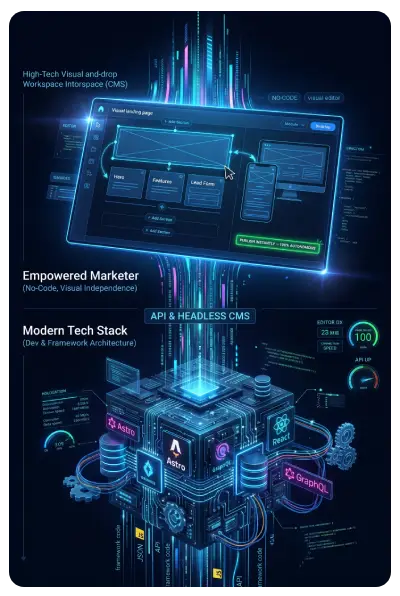
Almost always, yes. This is the hidden trap of moving from WordPress to an exotic headless or custom-coded JavaScript stack.
In traditional WordPress, your marketing team can draft a blog post, publish a promotion, create landing pages, or integrate tracking tags in minutes using the native block editor.
With custom headless architectures, that independence vanishes:
- Rigid Schemas: Content entry is restricted to predefined fields in a headless CMS interface like Contentful or Sanity.
- No Visual Previews: Live page editing and instant previews often break, making page design a guessing game.
- Developer Bottlenecks: Introducing a new layout component or landing page design requires frontend engineering sprints, testing, and deployment cycles.
For small to mid-sized marketing teams, losing publishing speed creates massive operational friction. Tuning your existing WordPress setup lets you retain complete publishing control while matching the speed of a custom-coded framework.
Traffic Protection: Will Rebuilding Our Site Break Our Current SEO Rankings and Organic Search Traffic?
Full website redesigns and platform migrations are notorious for wiping out organic search traffic. Even experienced development teams run into crawl issues during full migrations.
When you migrate a site, several things commonly break:
- URL Structure Changes: Permalinks shift, redirects fail, and historical backlink authority is lost.
- Crawl and Render Changes: JavaScript frameworks can create client-side rendering problems that make it harder for search engines to index internal links and text content cleanly.
- Schema Graph Severing: Critical JSON-LD schema blocks get lost during the template migration, breaking entity clarity for search algorithms.
- 404 Spikes: Scrapers and legacy search links run into missing directories, triggering crawl budget waste. If your site recently went through an update and you notice an influx of crawling errors, review our diagnostic guide on handling a sudden spike in 404 errors search console to prevent crawl budget loss.
Optimizing your existing WordPress foundation eliminates these migration risks entirely. Your URL structures, content hierarchy, and internal link equity remain untouched while your Core Web Vitals improve.
The Strategic Shift: Combining Speed, UX, and AI Search Optimization
A fast website is essential, but speed is only one piece of the digital puzzle. In today’s landscape, your website must be built for three distinct audiences:
- Human Visitors: Clean user experience design that guides attention, reduces cognitive load, and turns visitors into leads.
- Traditional Search Engines: Fast load times, validated schema markup, and lean code that search engines reward with strong visibility.
- Answer Engines: Large Language Models (LLMs) like ChatGPT, Perplexity, and Claude that crawl the web to answer direct questions about your industry.
When an AI engine evaluates your site, it looks for quick responses, clean semantic HTML, and machine-readable content structures. If your site stalls on heavy scripts or buries information under layers of unrendered code, AI engines skip past your content.
Achieving that balance requires a hybrid skill set. Most companies hire separate freelancers for design, development, SEO, and copywriting, which leads to fragmented communication and finger-pointing when sites run slow.
I handle all of those disciplines directly: custom WordPress engineering, user experience design, technical SEO, and modern Answer Engine Optimization. To understand how structured content connects with search systems, explore our guide on using a WordPress plugin for answer engine optimization, or discover our local Michigan answer engine optimization services to prepare your brand for modern conversational discovery. For broader strategies across the entire WordPress ecosystem, check out our comprehensive WordPress pillar resource.
Frequently Asked Questions Answered by a WordPress Speed Optimization Consultant
What does a WordPress speed optimization consultant actually do?
A WordPress speed optimization consultant audits, refactors, and fine-tunes your existing code, database, and server configuration. Instead of pitching a redesign, they eliminate render-blocking assets, optimize database queries, configure advanced caching layers, and ensure your site passes Core Web Vitals without disrupting daily operations.
How long does it take to optimize a slow WordPress site?
Most targeted WordPress performance sprints take between one and two weeks. That timeline includes baseline benchmarking, code refactoring, asset compression, database indexing, and post-deployment validation across real mobile devices.
Will speed optimization affect our third-party marketing tools like HubSpot or GA4?
No. Performance optimization does not mean deleting your critical business tools. Instead, it involves orchestrating how and when those scripts load, ensuring your essential tracking continues while preventing those scripts from delaying the visual paint of the page.
What is the difference between TTFB, LCP, and INP? Acronyms Explained by a WordPress Speed Optimization Consultant
Time to First Byte (TTFB) measures how quickly your server responds to a browser request. Largest Contentful Paint (LCP) measures how long it takes for the main visual content to appear on the screen. Interaction to Next Paint (INP) measures how quickly the page responds to user clicks, taps, or keystrokes.
Stop Wasting Capital on an Unnecessary Rebuild
You do not need to spend $50,000 to fix a slow website, and you do not need to abandon the WordPress publishing workflows your team relies on.
Get sub-second mobile speeds, pass Core Web Vitals, and turn your website into a high-converting growth engine. Book your audit with our dedicated WordPress speed optimization service today.
Master The New Rules Of WordPress Performance
Don’t let a slow site undermine your authority. Our WordPress Speed Optimization Service utilizes an “Architectural Hardening” methodology to strip away code bloat.

